Business rules
Business rules capture validation constraints that go beyond what a structural schema (XSD, JSON Schema) can express. Where a schema defines the structure and data types of a message, business rules encode the domain-specific logic. For example, in the world of European e-invoicing, the PEPPOL NL-R-001 rule states: "if the document is a credit note from a Dutch supplier, then it MUST contain a reference to the original invoice." This kind of conditional constraint cannot be expressed in XSD alone. It requires Schematron assertions that evaluate context at validation time.
In Semantic Treehouse, business rules are defined in natural language and can optionally be implemented as Schematron assertions for automated validation.
The Business rules overview is only accessible to Maintainers and above. Users do not see the Business rules page in the navigation menu. Adding, editing, deleting, and importing business rules is restricted to Administrators.
Business rule properties
Each business rule has the following fields:
- Rule identifier: a unique human-readable identifier for the rule. This identifier is used to reference the rule from message model elements.
- Rule text: the rule expressed in natural language, describing the constraint in a way that domain experts can understand.
- Purpose: an explanation of why this rule exists.
- Category: an optional grouping label to organize related rules, e.g. by source or specification.
- Flag: the severity level when the rule is violated. Typical values are
fatal(the message is invalid) andwarning(the message is valid but may have issues). - Locked: a toggle that prevents editing when enabled (see Locking business rules below).
Creating a business rule
Business rules are managed at the environment level, which means they are not tied to a specific specification version. This allows the same rule to be referenced by multiple message models.
Creating a business rule requires the Administrator role.
To create a business rule:
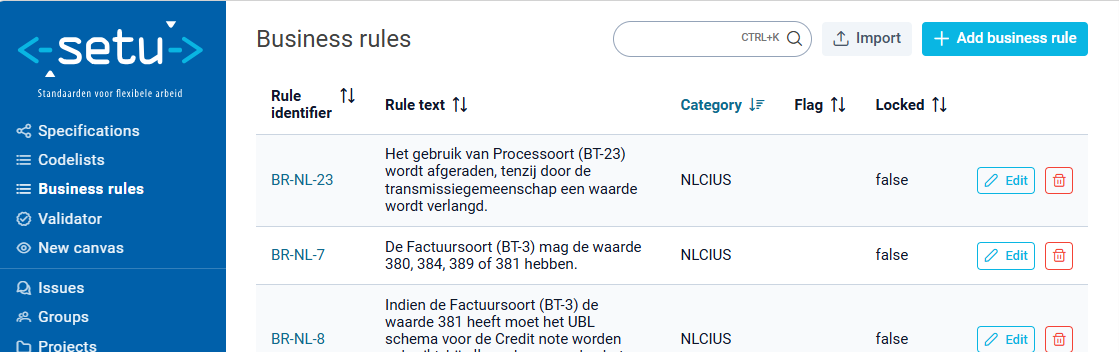
- Navigate to the Business rules overview.
- Click the '+ Add business rule' button to create a new rule.
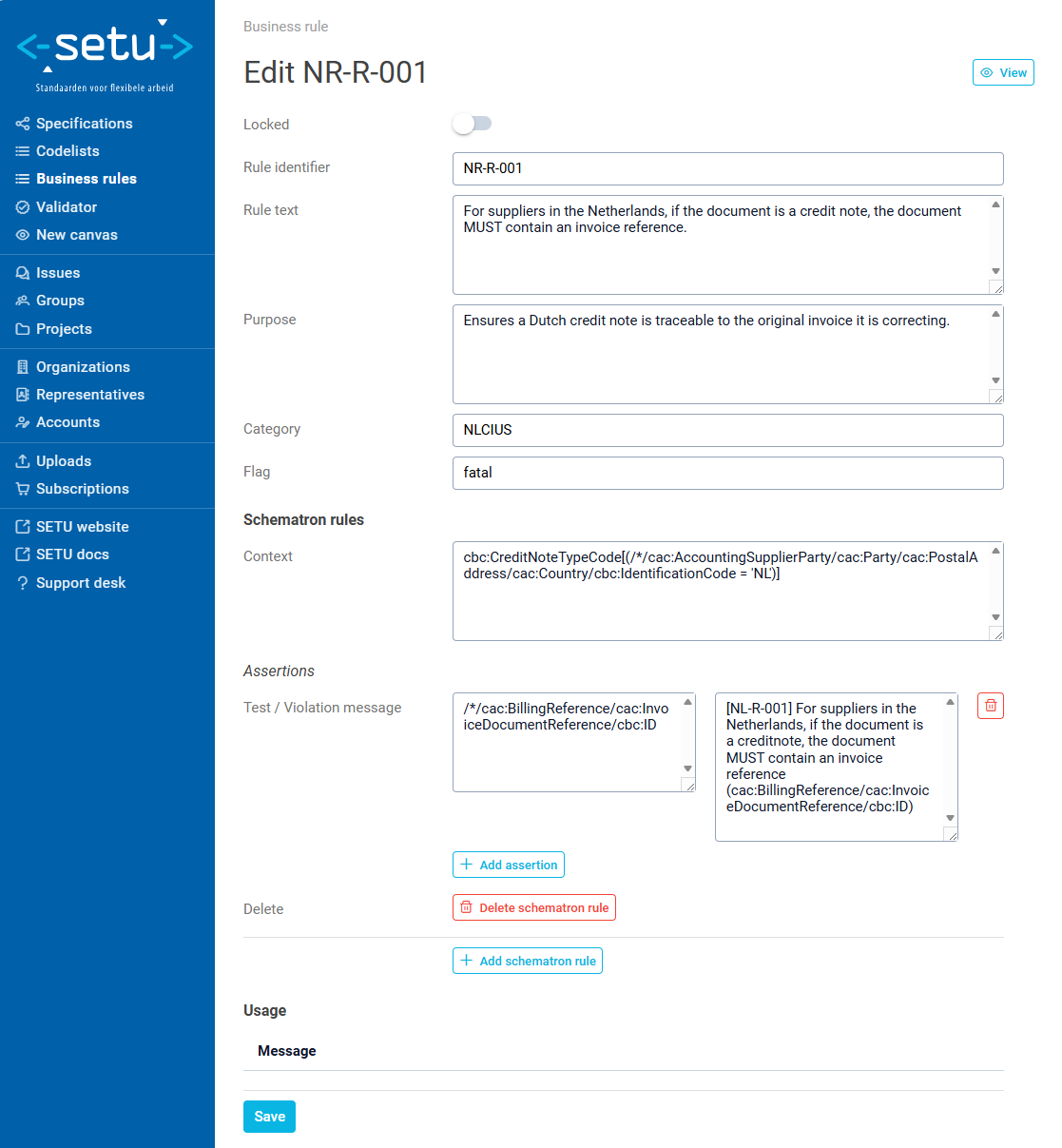
- Fill in the rule identifier, rule text, and flag (severity).
- Optionally add a purpose, category, and Schematron implementation.
Screenshot of steps 1-2:
Screenshot of steps 3-4 taking the previous example from the e-invoice domain:
Schematron implementation
A business rule can have one or more Schematron rules that implement the natural language constraint as executable validation logic. Each Schematron rule consists of:
- Context: an XPath expression defining where in the document the rule applies.
- Assertions: one or more test/message pairs:
- Test: an XPath expression that must evaluate to true for the document to be valid.
- Violation message: the error message shown when the test fails.
A single business rule can have multiple Schematron rules, each with their own context and assertions. This allows a rule to be checked at different points in a document structure.
To add a Schematron rule, use the '+ Add schematron rule' button in the Schematron rules section. Within each Schematron rule, use the '+ Add assertion' button to add test/message pairs.
Locking business rules
The Locked toggle prevents all editing of a business rule. This is particularly useful for rules that originate from external standards, which should not be modified by local maintainers.
When a business rule is locked:
- All form fields are disabled.
- Schematron rules and assertions cannot be added, modified, or removed.
- The lock must be explicitly toggled off before any changes can be made.
Importing business rules
Business rules can be bulk-imported from a YAML file. This is useful when migrating rules from an external system or when managing a large set of rules programmatically.
To import business rules:
- Navigate to the business rule import page.
- Upload a
.yamlor.ymlfile. - Click the Import button and the importer creates new rules or updates existing ones (matched by
humanId).
The YAML file must contain a list of business rule objects. Each object supports the following fields:
- humanId: "NL-R-001"                # Required — unique identifier
  naturalLanguage: "For suppliers in the Netherlands, if the document is a credit note, the document MUST contain an invoice reference."
  flag: "fatal"                       # Required — severity (fatal/warning)
  locked: true                        # Required — lock status
  category: "NLCIUS"                  # Optional — grouping
  schematronRules:                    # Optional — Schematron implementation
    - context: "cbc:CreditNoteTypeCode[(/*/cac:AccountingSupplierParty/cac:Party/cac:PostalAddress/cac:Country/cbc:IdentificationCode = 'NL')]"
      schematronAsserts:
        - test: "cac:BillingReference/cac:InvoiceDocumentReference/cbc:ID"
          message: "[NL-R-001] For suppliers in the Netherlands, if the document is a credit note, the document MUST contain an invoice reference (cac:BillingReference/cac:InvoiceDocumentReference/cbc:ID)."
Importing business rules requires an administrator role. When a rule with the same humanId already exists, its properties and Schematron rules are fully replaced with the imported values.
The YAML import format described above is an early implementation and is subject to change. A more standardized import format is planned but not yet scheduled. If you build tooling around this format, be prepared to adapt when the format evolves.
Using business rules in message models
Business rules can be linked to by individual elements in a message model. This connection documents which validation constraints apply to which parts of the data structure.
When importing a message model version, elements can reference business rules by their humanId through the businessRuleHumanIds field.
Integration with validation
Since business rules capture constraints in natural language and optionally in Schematron, they are primarily a documentation and governance tool. Whether and how those constraints are enforced at validation time is configured separately in the validator.
The most common approach is to upload Schematron and XSD files directly to the validator configuration, independent of the business rules defined here. In this setup the business rules serve as human-readable documentation of what the validator enforces, but the two are not automatically linked.
See the validator documentation for details on configuring validation.